Your thoughts,
your device.
A quiet place to write, keep a photo, and remember your day. Your journal stays on your device.
Write offline. No account. No subscription.
A few words. A moment kept.
Start with today, then return whenever you like.
A journal for everyday life.
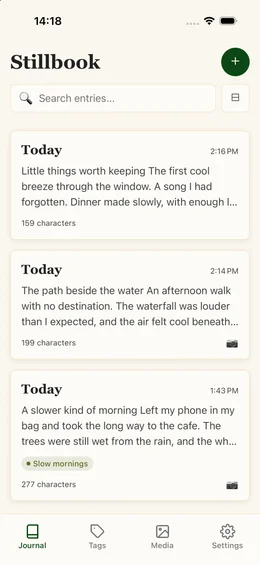
The little details deserve a place of their own. Stillbook keeps writing simple, with your words and memories close at hand.
Make room for your day
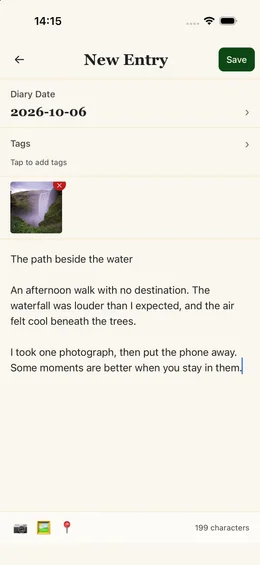
Write a few lines or a longer reflection. Choose the diary date, return to an entry, and keep adding to your story.
Keep the moments, too
Take a photo or import images into your media library, then attach them to an entry alongside your words.
Find your way back
Organize entries with colored tags. Search your words, filter by date, or look for entries with photos.
Add a sense of place
Optionally save your current location with an entry. Location access is requested when you choose to add it.
Keep a copy of your own
Create a content-only or full backup and save it wherever you choose. A full backup includes your media files.
Feel at home
Choose light, dark, or system appearance. Write with an interface available in eight languages.
A few words are a good start.
Open Stillbook and begin. There is no account to create and no connection needed to write.
Write an entry
Start in Journal, choose a date, and write what you want to remember. Tap Save when your new entry is ready.
Make it yours
Add tags, attach photos from Media, or capture a location. Return to your entries through search and filters.
Save a backup
In Settings, choose Create Backup. Select a full backup to include your photos, then save a copy somewhere safe.
Your backup files contain private journal data and are not password-encrypted. Read the backup guide.
A little space, just for you.
Stillbook is coming to the App Store for iPhone and iPad as a free download. No account or subscription required.
The download link will appear here once the app is available.
Read the getting-started guideA few things to know.
Do I need an account or an internet connection?
No account is needed. Writing, viewing entries, searching, and managing tags work offline. Some system features, such as looking up a place name or saving a backup to a cloud drive you choose, may need a connection.
Where does my journal live?
Entries, tags, and imported media are stored locally on your device. Stillbook does not upload your journal to a Stillbook server or provide automatic cloud sync.
How do I move my journal to a new device?
Create a full backup from Settings and save it outside the app. Transfer that file to your new device, then use Restore Backup. Restoring replaces the journal data currently in the app, so back up any existing entries first.
Are my backups encrypted?
Backup files are not password-encrypted. Keep them in a location you trust, and avoid sharing them publicly. Use your device passcode and the security controls offered by your chosen storage provider.
Can support recover a lost journal?
We do not have a server copy of your journal. Recovery depends on a backup you saved or a device backup managed by your operating system. Create a full backup before uninstalling the app or changing devices.
Which languages can I use?
The interface supports English, Simplified Chinese, Traditional Chinese, Thai, Japanese, Vietnamese, Indonesian, and Korean. Change the interface language in Settings; you can write entries in any language.
Looking for more help? Visit Support.